ChatTea CLI 指南
这篇指南是当前 ChatTea Gitea 能力面的实用 CLI 地图。它覆盖已实现命令树、每个主要命令组背后的 REST API 或本地 辅助函数,以及来自本地 ChatTea 管理的 Gitea 服务的实践示例。
当前 CLI 树
chattea
├── set-token                 # ChatTea/Git token bootstrap helper
├── server                    # 本地 ChatArch Gitea 生命周期
│   ├── backup                # gitea dump 备份 / DB-only SQL 导出
│   ├── config                # app.ini path/show/get/set helper
│   ├── install               # 安装 Gitea binary,可选准备 MySQL 后端 infra
│   ├── init                  # 初始化 app.ini/work path,可选择 sqlite3/mysql,可跳过 migrate
│   ├── bootstrap             # install + init + admin + token,可选择 sqlite3/mysql
│   ├── serve                 # 前台 web 进程
│   ├── start/stop/restart    # user systemd service 生命周期,可指定 service name
│   ├── migrate mysql         # SQLite -> ChatData MySQL backend 迁移
│   ├── status/logs           # user systemd 检查
│   ├── version               # 本地 Gitea binary version
│   └── health                # REST: GET /api/v1/version
├── repo                      # 仓库 REST API + git clone helper
│   ├── list/view/create/edit/generate
│   ├── clone                 # 本地 git helper
│   └── migrate
├── issue                     # REST: /repos/{owner}/{repo}/issues
│   ├── list/view/create/edit/close/reopen/delete
│   ├── comment list/create/edit/delete
│   ├── label add/remove
│   └── assign add/remove
├── label                     # REST: /repos/{owner}/{repo}/labels
│   └── list/view/create/edit/delete
├── milestone                 # REST: /repos/{owner}/{repo}/milestones
│   └── list/view/create/edit/close/delete
├── pr                        # REST: /repos/{owner}/{repo}/pulls
│   ├── list/view/create/edit/close/reopen/merge
│   ├── diff/patch/commits/files
│   ├── comment list/create
│   └── review list/create/submit
├── release                   # REST: /repos/{owner}/{repo}/releases
│   ├── list/view/latest/by-tag/create/edit/delete
│   └── asset list/delete
├── project                   # Gitea repo-scoped 项目看板
│   ├── list/view/create/edit/delete
│   ├── column list/create/edit/delete
│   ├── card list/add/remove/move
│   └── issue list/add/remove/move   # card 的兼容别名
├── runner                    # Gitea Actions runner registry + local instances
│   ├── registry token/list/view/enable/disable/delete
│   ├── local install/create/register/list/view/start/stop/restart/status/logs/doctor/remove
│   ├── local config show/set-labels/set-capacity/set-workdir/set-backend
│   ├── pool create/start/stop/status/remove
│   └── workflow labels/example/check
├── run                       # REST: /repos/{owner}/{repo}/actions/runs
│   └── list/view/jobs/logs/rerun/rerun-failed/delete
├── job                       # REST: /repos/{owner}/{repo}/actions/jobs
│   └── view/logs/rerun
├── artifact                  # REST: /repos/{owner}/{repo}/actions/artifacts
│   └── list/view/download/delete
├── auth                      # auth/login/status/token 便利入口
├── token                     # Gitea access token create/list/delete/bootstrap
├── bot                       # 本机 Gitea bot / 服务账号 local backend
│   ├── plan/create/delete
│   └── token create
└── api                       # 原始 Gitea API passthrough
实现合约
ChatTea 命令应是薄 Click 包装层。每个实质命令都调用一个可导入 Python 函数或 GiteaClient method。
示例:
from chattea.api import GiteaClient
from chattea.commands.repo import create_repository
from chattea.commands.issue import create_issue
from chattea.commands.project import add_card
from chattea.commands.runner import register_local_runner
from chattea.commands.run import list_runs
from chattea.commands.job import job_logs

client = GiteaClient()
repo = create_repository(name="demo", owner="gitea_admin")
template_repo = create_repository(name="template", owner="gitea_admin", template=True)
issue = create_issue("gitea_admin/demo", title="Document CLI")
add_card("gitea_admin/demo", project_id=1, column_id=1, issue_id=issue["id"])
register_local_runner("demo", scope="repo", repo="gitea_admin/demo", labels="chattea-runner-demo")
runs = list_runs("gitea_admin/demo")
logs = job_logs("gitea_admin/demo", job_id=6)
服务和令牌流程
本地开发服务从 ChatEnv 和 Gitea server lifecycle 命令开始:
# 默认 SQLite:
chattea server bootstrap -I

# 新装直接使用 ChatData-managed MySQL:
chattea server bootstrap --database-backend mysql --admin-password-env GITEA_ADMIN_PASSWORD --start-service -I

chattea server health
chattea token bootstrap --username gitea_admin --password-env GITEA_ADMIN_PASSWORD --scope all
需要 Actions 时,先在 Gitea app.ini 中启用,然后重启托管服务:
chattea server config set --section actions --key ENABLED --value true -I
chattea server restart
chattea server health
server config set 修改的是 app.ini;这是运行时配置,通常需要 restart 才可靠生效。相比之下,问题/PR/project/run/job/运行器 的 REST API 命令操作的是 live Gitea state,不需要重启 Gitea。
Token 边界要分清楚:ChatTea 这个 Python 源码仓库的 remote 是 GitHub,push 和 PR 使用 chatgh / GitHub token;临时实践仓库的 remote 是自建 Gitea,仓库 API 和 git push 使用 chattea / Gitea token。chattea set-token 只应在 Gitea 仓库目录里写 repo-local git extraHeader,或者通过 --repo OWNER/NAME 明确指定 Gitea 仓库;不应把 Gitea token 写进 GitHub 源码仓库的 local git config。
仓库、问题和项目看板示例
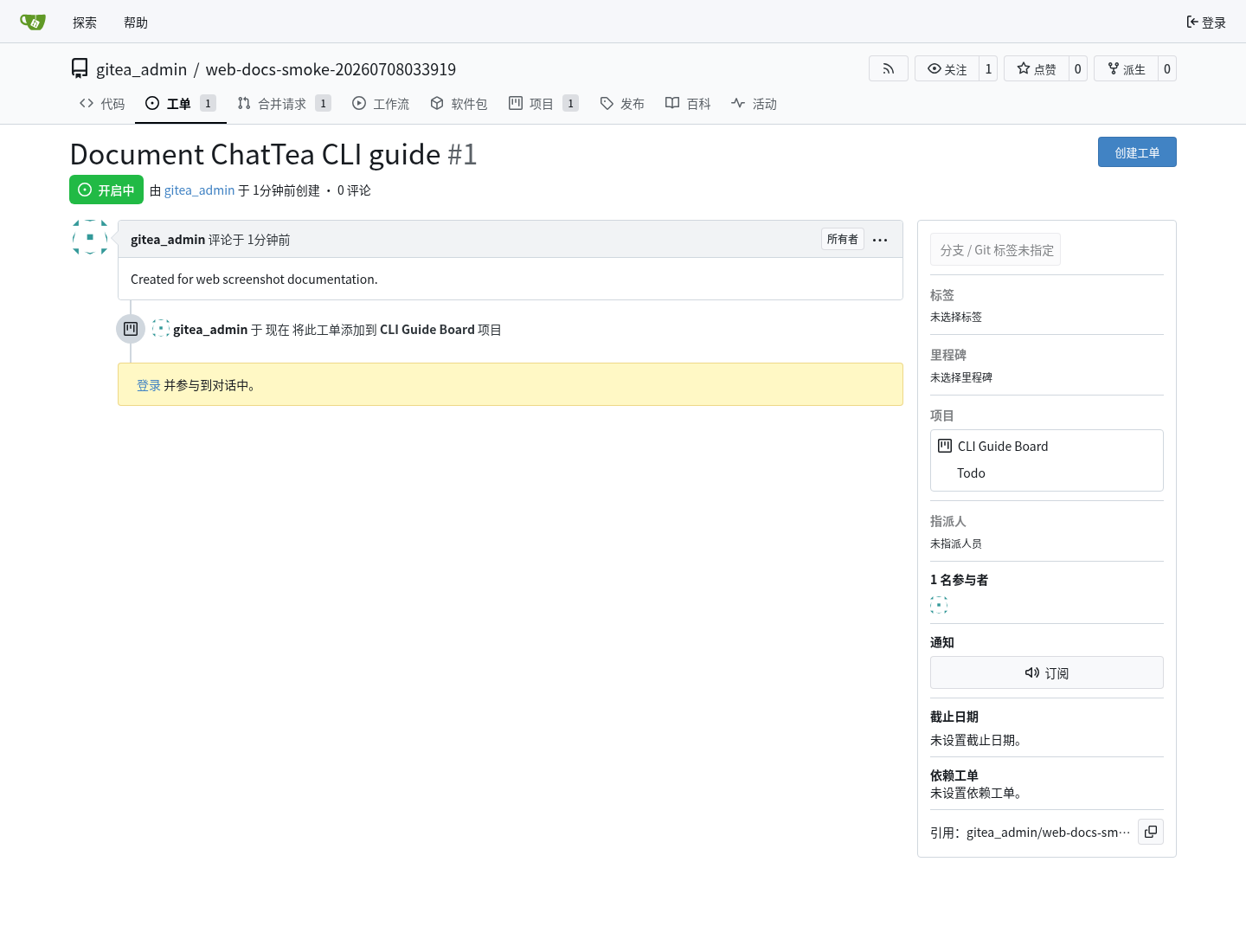
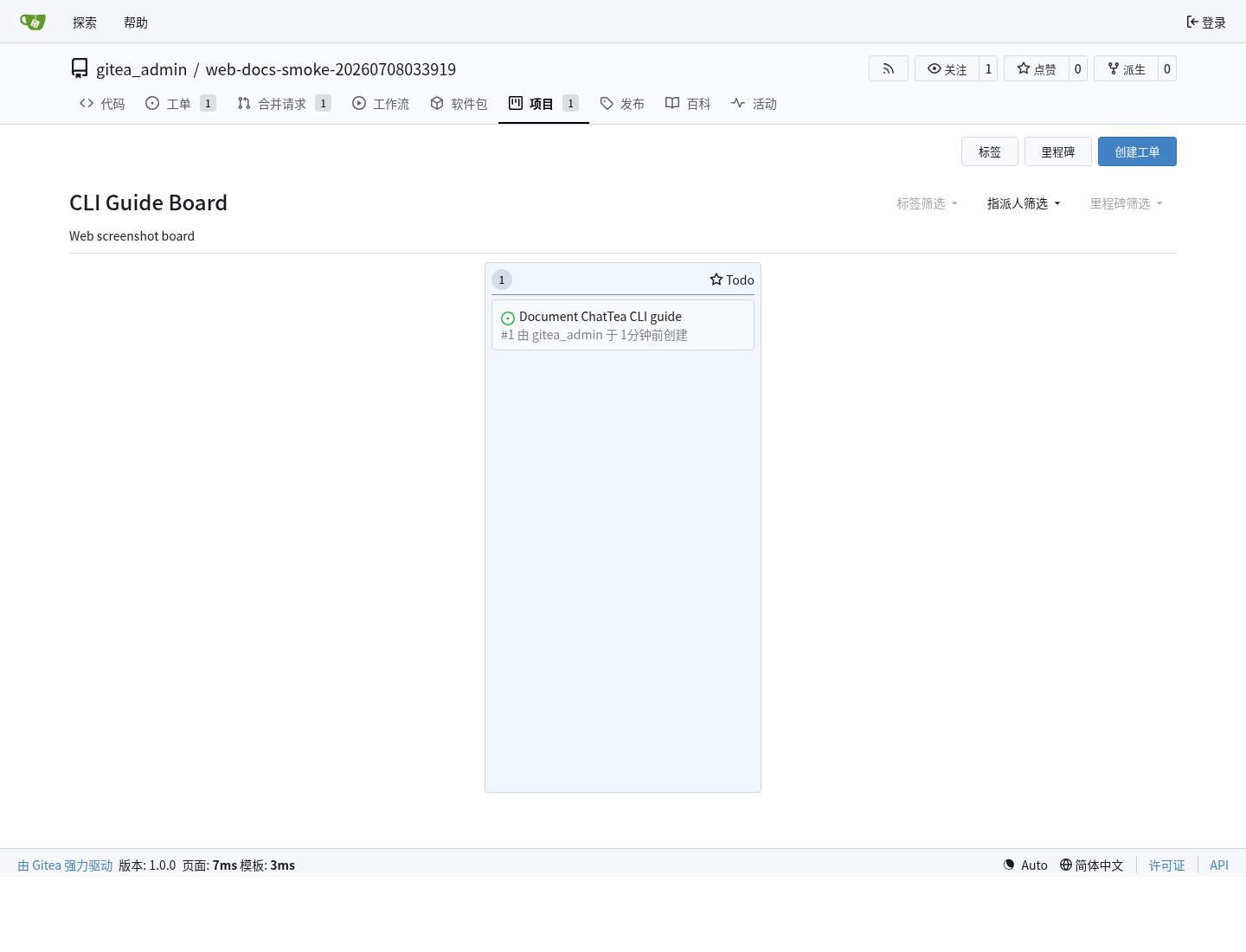
下面流程在本地 ChatTea 管理的 Gitea 服务上运行:创建 仓库,添加 问题 元数据,创建 仓库级 项目看板,然后把 问题 添加为 项目卡片。模板仓库可以通过 chattea repo create --template 创建,通过 chattea repo edit OWNER/NAME --template/--no-template 切换,并通过 chattea repo generate --template OWNER/TEMPLATE --owner OWNER --name NAME --copy-git-content 生成新仓库;Gitea 要求生成时至少选择一个 --copy-* 项。
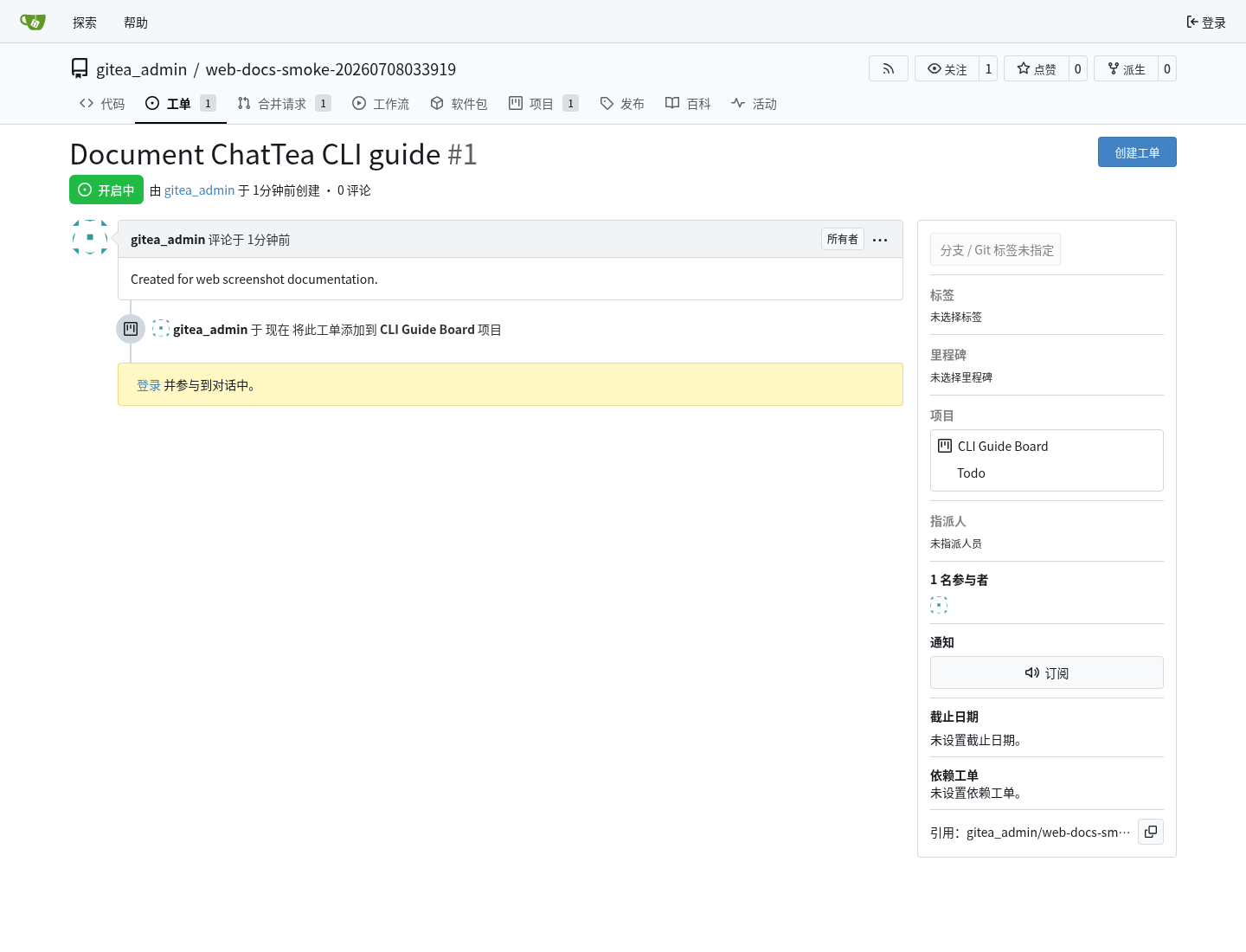
Gitea Web 问题 页面:
Gitea Web 项目看板 页面:
同一流程的 CLI 记录:
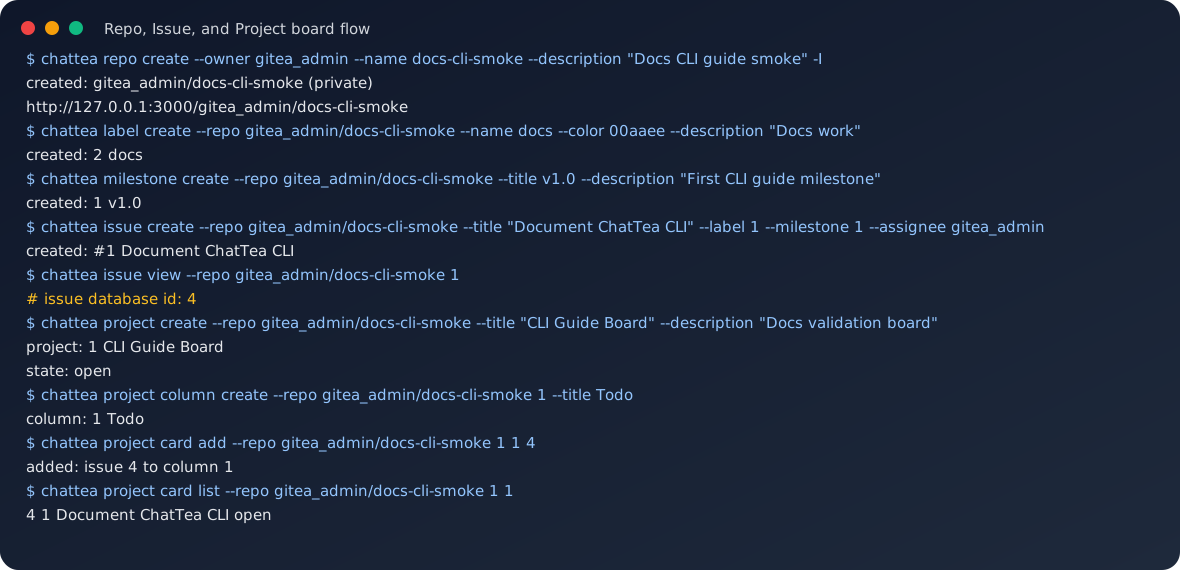
重要细节:project card add 映射到 Gitea 项目卡片 API,期望的是 问题 数据库 id,不是页面上显示的 问题编号 #1。可以运行 chattea issue view --repo OWNER/REPO 1,读取返回里的 id 字段。
核心 路由 映射:
chattea issue create       -> POST /repos/{owner}/{repo}/issues
chattea issue view         -> GET /repos/{owner}/{repo}/issues/{index}
chattea project create     -> POST /repos/{owner}/{repo}/projects
chattea project column     -> /repos/{owner}/{repo}/projects/{project_id}/columns
chattea project card add   -> POST /repos/{owner}/{repo}/projects/{project_id}/columns/{column_id}/issues/{issue_id}
合并请求示例
PR 是一个仓库 REST API 操作。下面截图是 chattea pr create 创建出的 Gitea Web 合并请求 页面。
CLI 命令:
chattea pr create \
  --repo gitea_admin/demo \
  --title "Trigger Actions practice" \
  --head feature/practice \
  --base main \
  --body "Created by ChatTea practice"

chattea pr list --repo gitea_admin/demo --state all
chattea pr view --repo gitea_admin/demo 1
chattea pr diff --repo gitea_admin/demo 1
chattea pr files --repo gitea_admin/demo 1
路由 映射:
chattea pr create      -> POST /repos/{owner}/{repo}/pulls
chattea pr list/view   -> GET /repos/{owner}/{repo}/pulls
chattea pr diff/patch  -> GET /repos/{owner}/{repo}/pulls/{index}.diff/.patch
chattea pr merge       -> POST /repos/{owner}/{repo}/pulls/{index}/merge
实践注意:推送新分支后立刻创建 PR,可能和 Gitea 分支可见性刷新产生竞态。如果刚 push 后 Gitea 返回 404,短暂等待后用同一个 head=feature/practice payload 重试即可。
运行器和 Actions 流程
运行器支持分两层:
- Gitea registry 层:
- 注册令牌;
- 运行器 list/view/enable/disable/delete;
- repo/user/org/admin scope。
- 本机 local 层:
- 安装或复制
gitea-runner; - 为每个 runner name 写独立 root/config/workdir;
- 用 Gitea 注册令牌注册 runner;
- 管理
chattea-runner@<runner-name>.service。
第一版实现默认使用 host 运行器标签:
<runner-label>:host
workflow 中使用冒号前的 label:
runs-on: <runner-label>
真实实践已经验证:repo-scope 两个 host runner 可以在同一台机器、同一 Unix 用户下并发处理同一个 PR workflow 的两个 job;user-scope、org-scope、admin-scope runner 也分别被对应仓库 workflow 调用成功。更完整的配置、运行目录、scope 和并发结论见 Actions / Flow(动作 / 流程)快速开始。
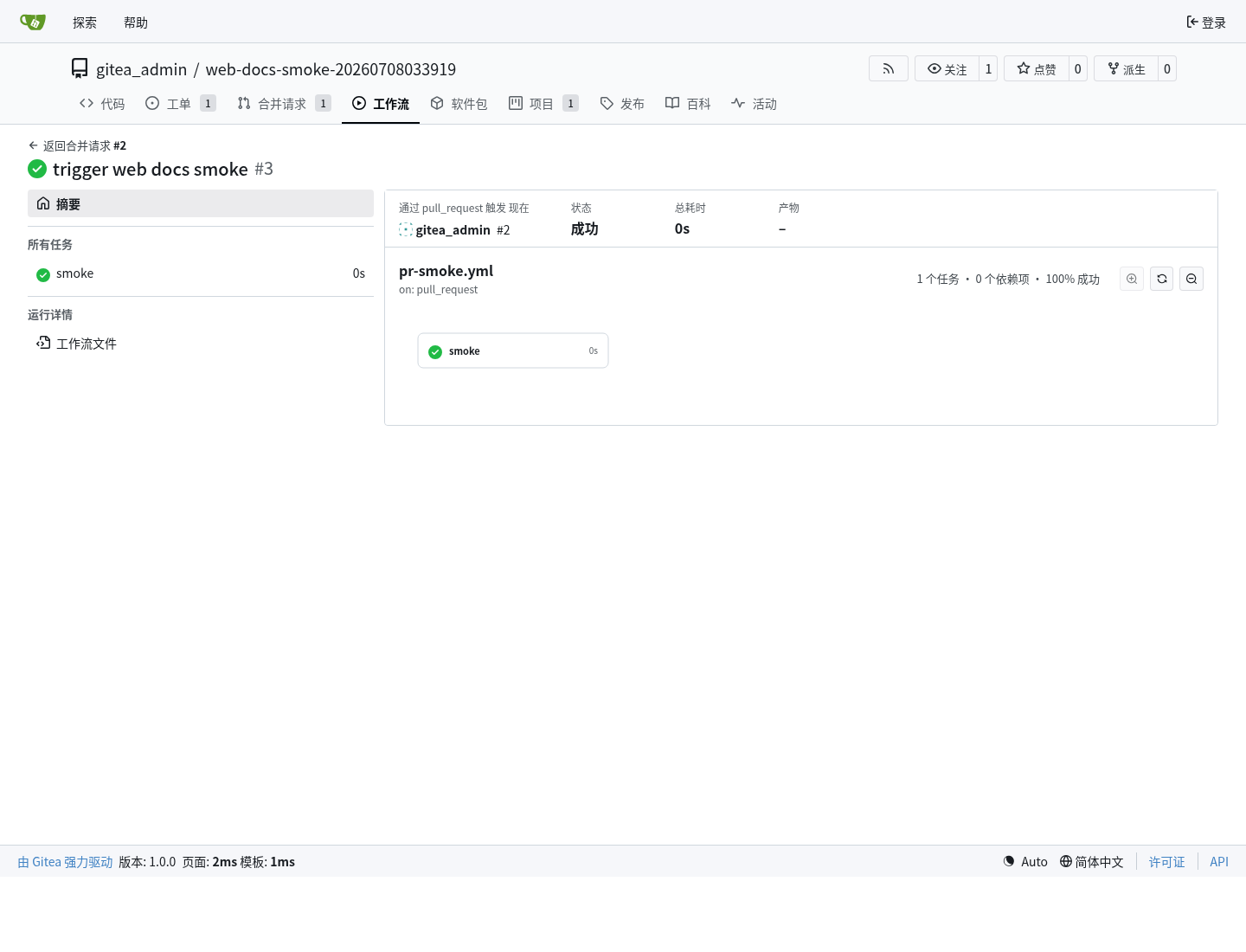
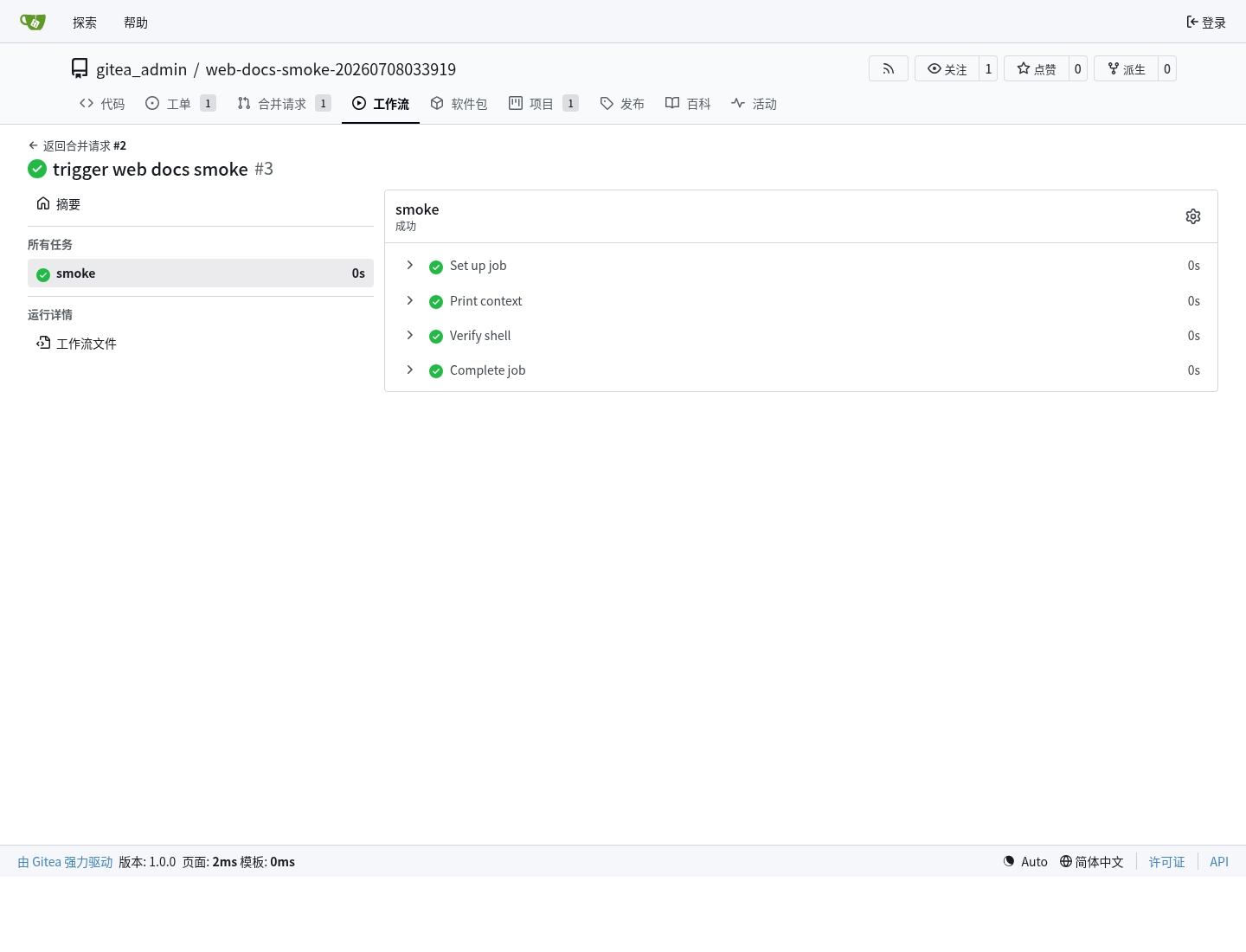
下面的 Actions run 和 job 页面展示工作流被注册运行器接收并成功完成。
运行器 local 注册和维护的 CLI 记录:
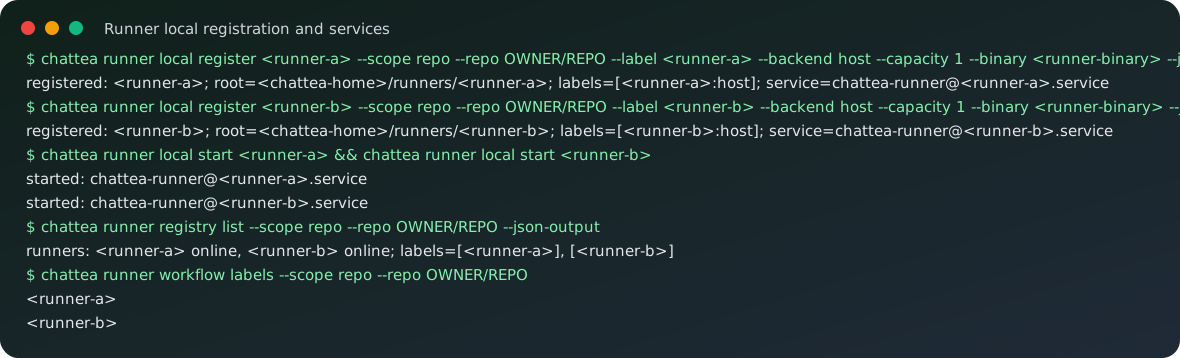
路由 和 辅助函数 映射:
chattea runner registry token   -> POST /repos/{owner}/{repo}/actions/runners/registration-token
chattea runner registry list    -> GET /repos/{owner}/{repo}/actions/runners
chattea runner registry enable  -> PATCH /repos/{owner}/{repo}/actions/runners/{runner_id}
chattea runner registry disable -> PATCH /repos/{owner}/{repo}/actions/runners/{runner_id}
chattea runner registry delete  -> DELETE /repos/{owner}/{repo}/actions/runners/{runner_id}
chattea runner local *          -> local helper around <chattea-home>/runners/<runner-name> and user systemd
runner registry enable/disable 使用 Gitea 的 disabled 字段。
运行、任务和日志示例
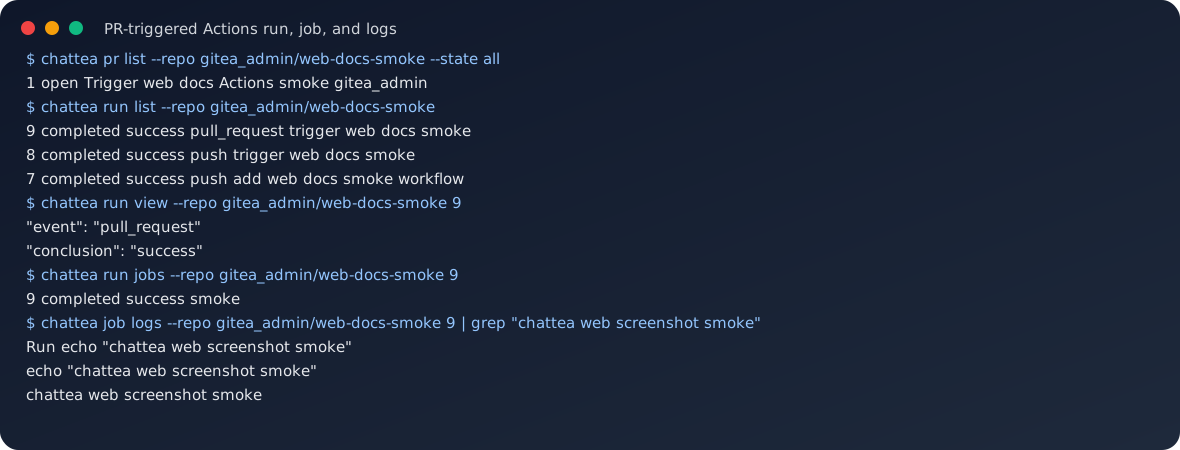
PR 触发 工作流 后,主要操作面是 run 和 job。运行器 章节展示了 Gitea run/job 页面;下面的 CLI 记录 展示同一状态如何通过 ChatTea 命令查看。
路由 映射:
chattea run list           -> GET /repos/{owner}/{repo}/actions/runs
chattea run view           -> GET /repos/{owner}/{repo}/actions/runs/{run}
chattea run jobs           -> GET /repos/{owner}/{repo}/actions/runs/{run}/jobs
chattea run logs           -> 聚合 run jobs 和 job logs 的 helper
chattea run rerun          -> POST /repos/{owner}/{repo}/actions/runs/{run}/rerun
chattea run rerun-failed   -> POST /repos/{owner}/{repo}/actions/runs/{run}/rerun-failed-jobs
chattea job view           -> GET /repos/{owner}/{repo}/actions/jobs/{job_id}
chattea job logs           -> GET /repos/{owner}/{repo}/actions/jobs/{job_id}/logs
chattea job rerun          -> POST /repos/{owner}/{repo}/actions/runs/{run}/jobs/{job_id}/rerun
已验证的本地实践结果:
repository: gitea_admin/<actions-practice-repo>
runner: <chattea-runner-name>
pull_request run: 9
job: 9
result: success
log marker: workflow output marker appears in job logs
产物命令
工作流 上传 产物 后,可以通过 CLI 包装的 仓库 Actions 产物 API 查看、下载和删除:
chattea artifact list --repo gitea_admin/demo
chattea artifact list --repo gitea_admin/demo --run-id 6
chattea artifact view --repo gitea_admin/demo 10
chattea artifact download --repo gitea_admin/demo 10 --output artifact.zip
chattea artifact delete --repo gitea_admin/demo 10
路由 映射:
chattea artifact list      -> GET /repos/{owner}/{repo}/actions/artifacts
chattea artifact view      -> GET /repos/{owner}/{repo}/actions/artifacts/{artifact_id}
chattea artifact download  -> GET /repos/{owner}/{repo}/actions/artifacts/{artifact_id}/zip
chattea artifact delete    -> DELETE /repos/{owner}/{repo}/actions/artifacts/{artifact_id}
当前刻意不做一等封装的部分
下面这些仍可通过 chattea api 访问,但不属于第一版 打磨后的 CLI 能力面:
chattea workflow list/view/dispatch/enable/disable
chattea secret list/set/delete
chattea variable list/view/create/edit/delete
工作流 定义文件仍放在 git 中,例如 .gitea/workflows/*.yml。第一版端到端流程里,推送 工作流 文件,再配合 运行器/run/job/log 命令,是最直接的验证信号。