仓库协作快速开始
这篇文档记录一次在隔离 ChatArch Gitea 实例上运行的本地 ChatTea CLI 端到端流程。它是一个代表性的 实践验证路径,不是每个 仓库 级命令的完整测试。
该流程覆盖这些命令:
chattea server bootstrap
chattea server health
chattea repo create
chattea label create/list
chattea milestone create/list
chattea issue create/comment/close/list
chattea release create 在空仓库上的错误处理
ChatTea 0.2.3 还包括 pr、release、runner、run、job 和 artifact 命令组。本文只聚焦仓库协作;运行器注册、PR 触发的工作流 run、job、log 和产物见 Actions / Flow 快速开始。
1. 启动隔离的本地 Gitea
这次实践验证使用任务本地的 CHATARCH_HOME、任务本地的 Gitea work path,以及本地 ChatArch Gitea 二进制文件。管理员密码通过环境变量传入,CLI 不打印密码。
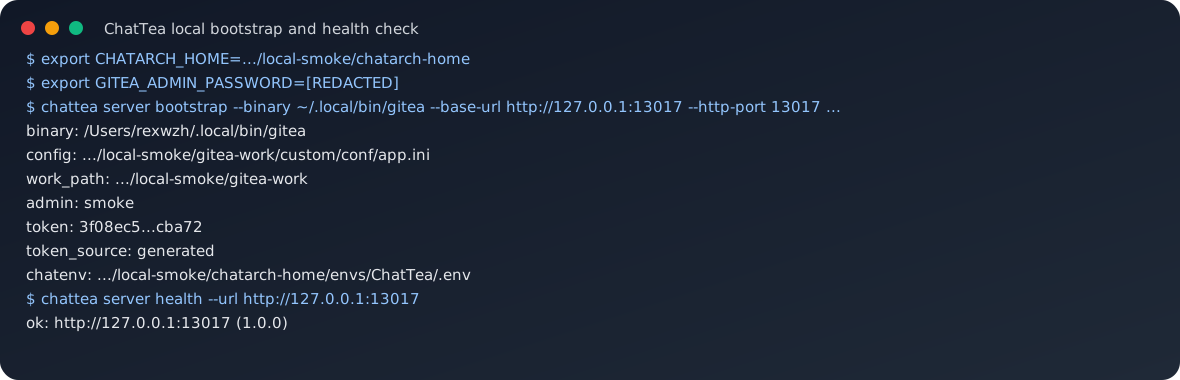
等价命令形态:
export CHATARCH_HOME=/path/to/local-practice/chatarch-home
export GITEA_ADMIN_PASSWORD='[REDACTED]'

chattea server bootstrap \
  --binary ~/.local/bin/gitea \
  --work-path /path/to/local-practice/gitea-work \
  --config /path/to/local-practice/gitea-work/custom/conf/app.ini \
  --base-url http://127.0.0.1:13017 \
  --listen-addr 127.0.0.1 \
  --http-port 13017 \
  --admin-user practice \
  --admin-email practice@example.invalid \
  --admin-password-env GITEA_ADMIN_PASSWORD \
  --token-name default \
  --token-scopes all \
  -I

chattea server health --url http://127.0.0.1:13017
这个步骤证明:
- ChatTea 可以从隔离状态初始化一个本地 ChatArch Gitea 实例;
server bootstrap会通过本地 Gitea admin CLI 创建管理员和 令牌;- 生成的 令牌 在 CLI 输出中会被脱敏;
server health可以确认 Gitea API 端点 可达。
2. 运行仓库协作流程
完成 引导 后,同一个 ChatEnv 配置档 会提供 CHATTEA_BASE_URL 和 CHATTEA_TOKEN,因此 仓库 级命令不再需要重复传 令牌 参数。
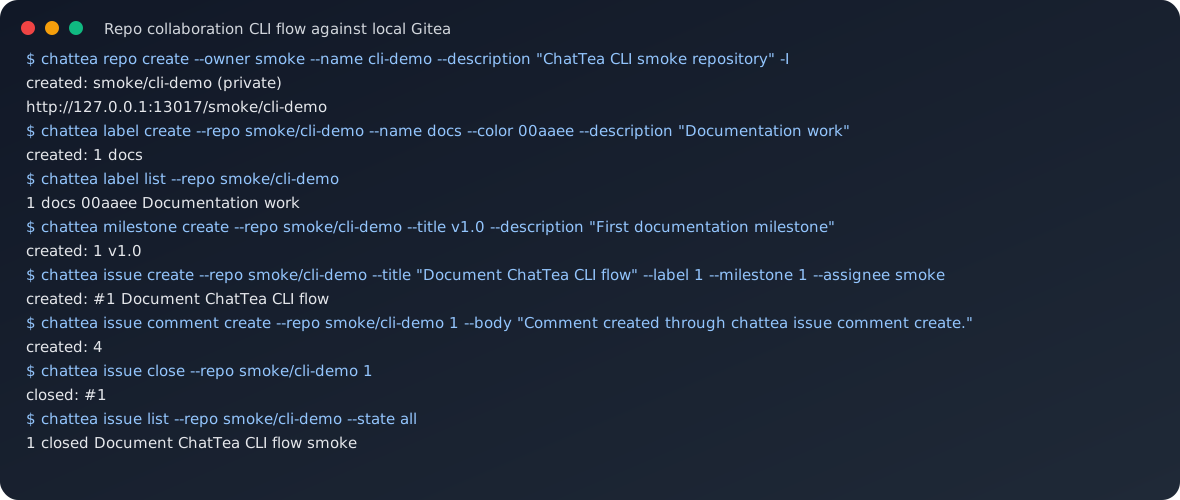
等价命令形态:
chattea repo create \
  --owner practice \
  --name cli-demo \
  --description 'ChatTea CLI practice repository' \
  -I

chattea label create \
  --repo practice/cli-demo \
  --name docs \
  --color 00aaee \
  --description 'Documentation work'

chattea label list --repo practice/cli-demo

chattea milestone create \
  --repo practice/cli-demo \
  --title v1.0 \
  --description 'First documentation milestone'

chattea milestone list --repo practice/cli-demo

chattea issue create \
  --repo practice/cli-demo \
  --title 'Document ChatTea CLI flow' \
  --body 'Practice issue created by ChatTea.' \
  --label 1 \
  --milestone 1 \
  --assignee practice

chattea issue comment create \
  --repo practice/cli-demo \
  1 \
  --body 'Comment created through chattea issue comment create.'

chattea issue close --repo practice/cli-demo 1
chattea issue list --repo practice/cli-demo --state all
这个步骤证明:
repo create可以通过 Gitea API 创建仓库;label create/list可以创建并读取仓库 标签;milestone create/list可以创建并读取仓库 里程碑;issue create可以绑定 标签、里程碑和 负责人;issue comment create可以添加 问题 评论;issue close可以通过 问题 edit 路由 更新 问题 状态;issue list --state all可以看到最终 已关闭问题 状态。
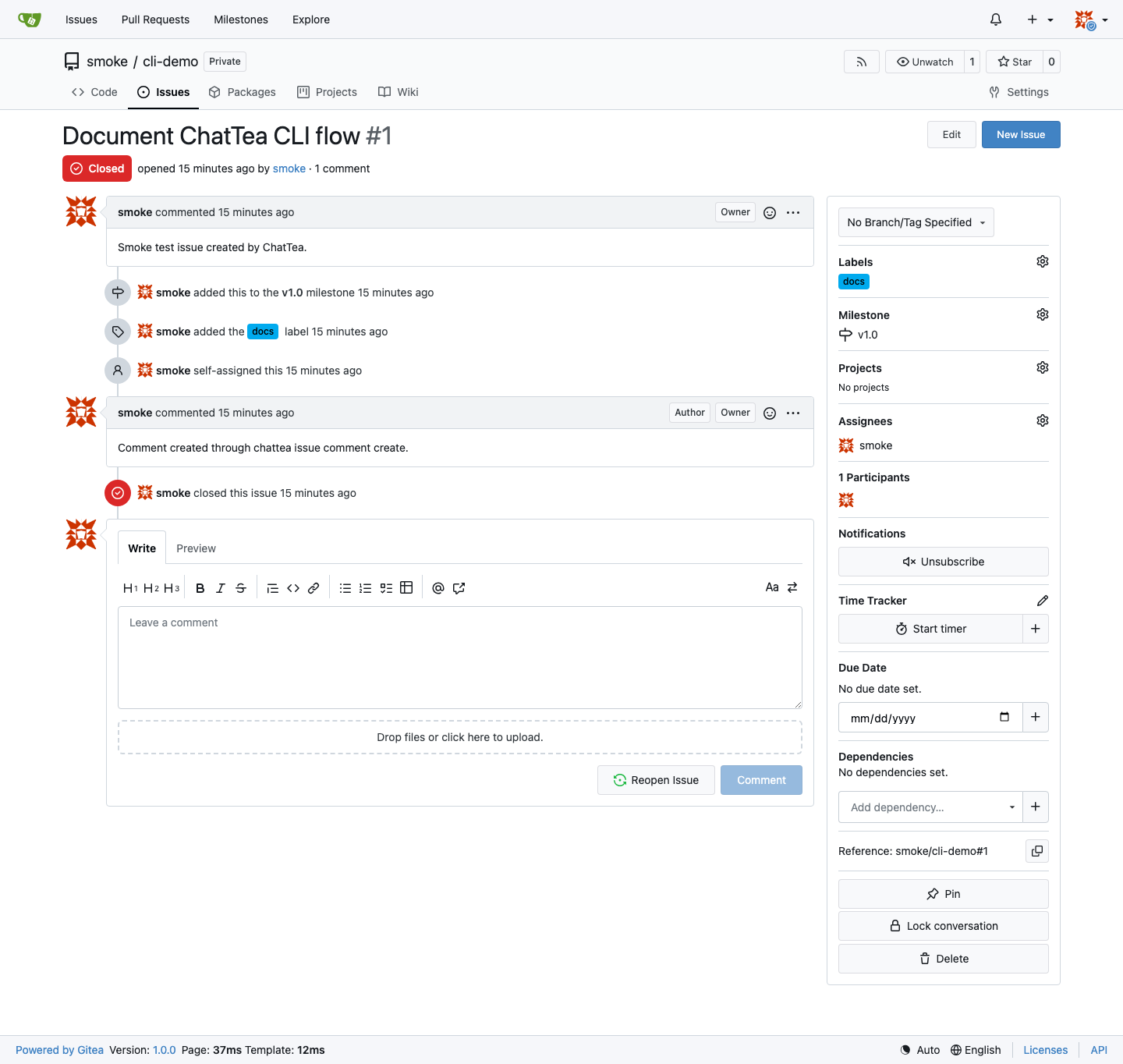
同一个结果也能在 Gitea Web UI 中看到。问题页面会展示由 ChatTea 创建的 已关闭问题,以及 docs 标签、v1.0 里程碑和通过 chattea issue comment create 创建的评论。
3. Release 命令错误处理
Release 路由底层是 POST /api/v1/repos/{owner}/{repo}/releases,但空仓库无法创建 release。实践验证流程故意在空的 cli-demo 仓库上尝试创建 release,用来验证 CLI 会输出干净的 Gitea API 错误,而不是 Python 回溯。

真正的 release create 实践验证 应该在至少有一个 commit/tag 的仓库上运行:
chattea release create \
  --repo practice/cli-demo \
  --tag v0.1.0 \
  --name 'Local practice release'
已复核但未放进截图流程的能力
ChatTea 还包括下面这些 API 支撑的能力,单元测试、CLI 覆盖和 路由 证据见 docs/interface-tree.md、docs/cli-alignment.md 和 docs/actions-flow-quickstart.md:
chattea pr list/view/create/edit/close/reopen/merge/diff/patch/commits/fileschattea pr comment list/createchattea pr review list/create/submitchattea release list/view/latest/by-tag/create/edit/deletechattea release asset list/deletechattea runner registry token/list/view/enable/disable/deletechattea runner local install/register/start/stop/status/logs/doctor/removechattea run list/view/jobs/logs/rerun/rerun-failed/deletechattea job view/logs/rerunchattea artifact list/view/download/delete
当前仍刻意不纳入一等能力面的部分:
chattea pr checkout:这是本地 git 工作流,不属于当前 REST 支撑的能力面;- 发布版本 附件 上传:等 HTTP client 增加 multipart upload 支持后再补。